
 A recruiter reached out about an eCommerce manager role. I did what I also do and did some research on the company’s website.
It loaded fine. Clean layout. Products visible. Nothing obviously broken.
Then I ran it through a Shopify theme detector.
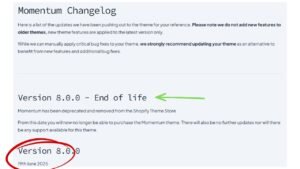
The theme wasn’t just old. It had been deprecated by the developer and was no longer listed in the Shopify theme store.
The site didn’t know it was behind. It just kept running.
What a Deprecated Shopify Theme Actually Means
Deprecated means the developer has stopped maintaining it. No bug fixes. No compatibility updates. No support. When Shopify ships platform changes: and they do, constantly: a deprecated theme doesn’t get updated to keep up.
That’s different from a theme that’s just old but still maintained. Deprecated means it’s off the list and the developer has moved on.
Your store can keep running on it indefinitely. That’s the part that makes it easy to miss.
Why This Matters More Right Now
Shopify has been aggressively building out its platform: AI-assisted checkout, personalization tools, merchant analytics, updated Liquid architecture. A lot of that functionality is tied to supported, actively maintained themes built on Online Store 2.0.
Platform limitations don’t just affect features—they can quietly drag down your search visibility too, which I cover in more detail in SEO in eCommerce: Unlocking Revenue Potential.”
If your theme is deprecated, you’re not getting those updates. You might not even know what you’re missing because the store still loads and products still check out.
There’s also a security angle. Older themes may rely on deprecated APIs or JavaScript libraries that Shopify has phased out. They don’t break immediately. They just accumulate risk until something forces the issue.
The gap between what your store could do and what it’s actually doing gets wider every time Shopify ships something new.
And if your theme controls how product titles and identifiers display, it’s worth asking the right questions about your product data—like whether your SKU belongs in the title at all.”
This Isn’t a Just Shopify problem
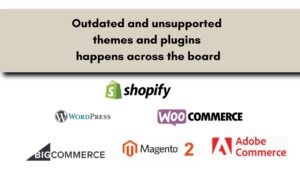
Every CMS does this. Themes get abandoned. Plugins stop being maintained. Versions go end-of-life.
WooCommerce, Magento, BigCommerce: none of them are immune. The difference is how quietly it happens. There’s no countdown timer. No email that says your theme stops being supported in 60 days. It just falls off the list and keeps running until something breaks: or until someone who knows what to look for actually checks.
Most business owners find out one of two ways: something stops working, or someone tells them.
How to Check Your Own Site in About 10 minutes
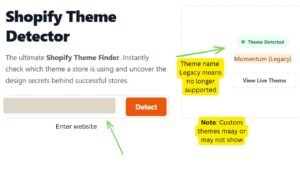
Shopify: A theme detector tool will tell you what theme you’re running and who built it. Search for it in the Shopify Theme Store. If it’s not there, go directly to the developer’s site and look for deprecation notices or a “no longer supported” label. Check your Shopify theme through shopthemedetector.com.
Enter your website and if you see legacy then it’s probably no longer supported and taken off the themes list on Shopify.

WooCommerce / WordPress: Check your theme and plugin update logs. If either hasn’t had an update in 12 or more months is worth a closer look. Cross-reference it in the WordPress theme and plugin repository to see if the developer is still active.
Magento / BigCommerce: Check your version against the platform’s current release notes. Magento has a long list of versions that have hit end-of-life. If you’re not on a supported version, you’re not getting security patches: which is a separate, bigger problem.
None of this requires a developer. It requires about 10 minutes and knowing where to look.
The Site Looking Fine is Not the Same as the Site Being Fine
This is the part that tends to get overlooked. A store that loads, displays products, and processes orders can still be quietly falling behind: in security, in performance, in the features your customers expect and your competitors already have.
The company that recruiter mentioned almost certainly didn’t know. The site looked fine to them too.
If this is making you reconsider your setup altogether, I put together a full guide on the factors to consider when choosing an eCommerce platform.”
If you haven’t looked under the hood in a while, it’s worth 10 minutes to check. ☕
If you want to see the broader context for how this fits into running a well-built eCommerce site, here’s an overview of the eCommerce work I do.
A store running on a solid, maintained theme is also better positioned for conversion rate optimization—platform gaps create friction that no amount of CRO testing can fix.